
SaaS
Extensions, desktop apps and embedded browsers for SaaS products
Your product lives in the browser. When it has to reach past its own tab, onto your customers’ other web apps, onto the desktop or inside another vendor’s software, the work becomes browser engineering. We build Manifest V3 extensions, Electron and Tauri desktop clients and embedded browsers for SaaS teams, and keep them working as browsers and stores change.
Engineering problems
Where SaaS products need browser engineering
Extensions that pass review and keep working
Manifest V3 runs background logic in a service worker that the browser can stop at any time, so state, timers and auth tokens need a different design. We scope permissions so Chrome Web Store, Edge Add-ons and Firefox review go smoothly, and package the Safari version as an Xcode app.
Enterprise rollout
Your customers’ IT teams force-install extensions through Google Admin, Intune or Group Policy and pre-configure them with managed storage. We build for that, and for SAML or OIDC single sign-on that works inside the extension and the desktop app, not only in your web app.
A desktop client that behaves like a product
A tray icon, deep links, notifications, offline behavior, code signing, macOS notarization and auto-update separate a desktop product from a wrapped web page. We ship those on Windows, macOS and Linux with Electron or Tauri.
Your customers’ security reviews
Enterprise buyers send security questionnaires and ask what the extension can read. We keep permissions narrow, ship no remote code (Manifest V3 does not allow it) and document data flows, so your SOC 2 and vendor-review answers are easy to write.
How we help
Services that apply
Proof
Work for SaaS companies
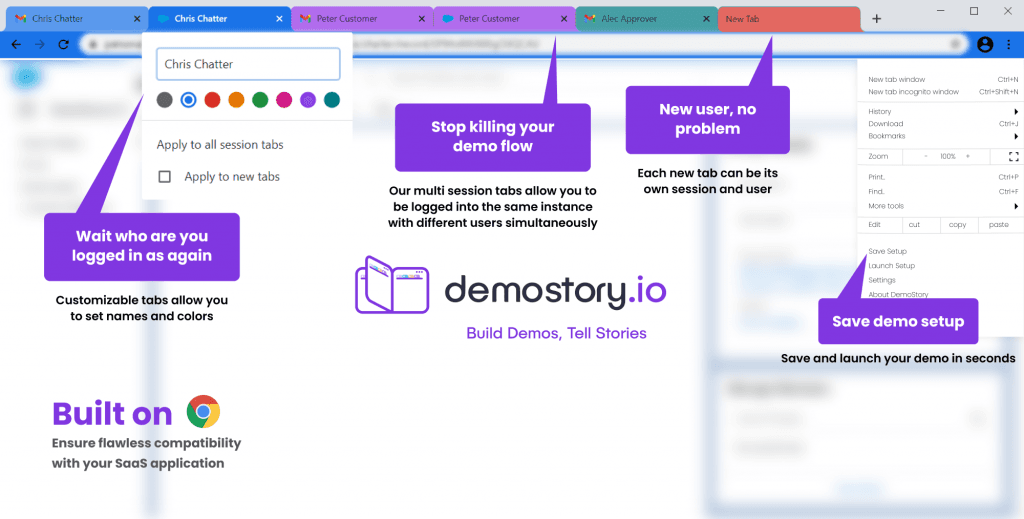
DemoStory is a Chromium browser for live SaaS product demos: each tab can be logged in as a different user, and a demo setup can be saved and reopened in one click. We built its multi-session core, payment system and admin dashboard.
From a Chrome extension client
“Great piece of technology. Very responsive communication, fast delivery, and happy to fix any issues that came up. If you need a good Chrome extension, you should hire him.”
FAQ
Common questions
It depends on where your users work. An extension fits when the product acts on other web pages, such as a CRM, email or a ticketing tool. A desktop app fits when you need system access, background work, offline use or a presence outside the browser. Some products need both, sharing one codebase. We recommend one before any build starts.
Most reviews finish within a few days. Extensions that ask for broad host permissions or contain a lot of code can take longer, and a rejection means another review. We keep permissions narrow and plan release dates around review.
Yes. Admins can force-install it through Google Admin, Microsoft Intune or Group Policy, and set its configuration, such as your tenant URL, through managed storage. We define that policy schema and test the managed install path.
Yes. We review the code, permissions and store status, then fix, migrate or continue development. If it still uses Manifest V2, it no longer runs in Chrome and needs moving to Manifest V3.
Typically 3 to 8 weeks for a new extension, 2 to 6 weeks to port an existing extension to another browser, and 2 to 5 months for an Electron or Tauri desktop app. These are typical ranges, not a quote. We confirm after a short review.
Next step
Discuss your SaaS project
Book a call or send a short brief. You will hear from engineers who have shipped this kind of software, with a clear view of the approach, the risks and what drives the effort.