
Services
Browser development services
We build custom Chromium and Firefox browsers, browser extensions and desktop apps, and we keep them updated after launch. Browser Developers has done this work for 11+ years.
Pick the closest match below, or send a project brief and an engineer will recommend the smallest option that works.
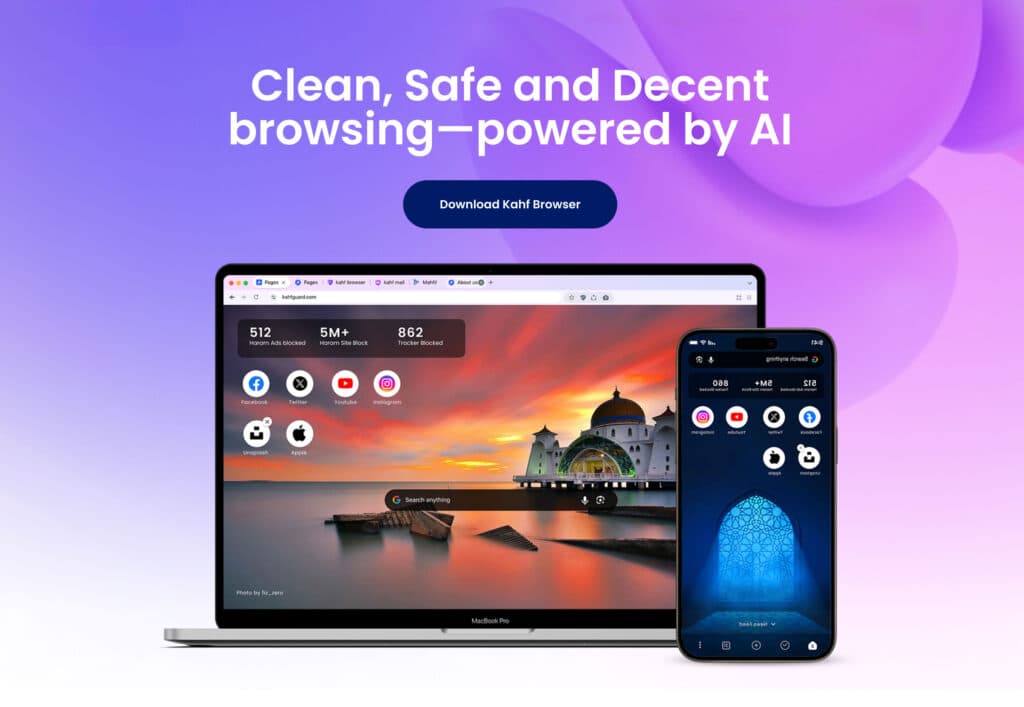
Browsers we have engineered for our clients





Start here
Which do you need?
Most projects start as one of these four. The right answer is sometimes the smaller option, and we will say so.
Browser extension
Ship a product inside browsers people already use.
Choose this when your users already have Chrome, Edge, Firefox, Brave or Safari, and the extension APIs are enough to deliver the product you have in mind.
Extension development02Custom browser
Your own browser, built on Chromium or Firefox.
Choose this when you need control the extension APIs cannot give you: engine-level privacy behavior, built-in features, enterprise policy, your own defaults and update channel.
Browser development03Desktop app
An Electron or Tauri app for Windows, macOS and Linux.
Choose this when you need an installable desktop product with native integration, signed installers, auto-update and a sound security model.
Desktop development04Embedded browser
Web content inside your own application.
Choose this when you have a native application that needs to show and control web content, and must choose between CEF, WebView2, WKWebView, Electron or Tauri.
Embedded browsersBrowsers
Custom browsers and browser security
Custom Chromium, Firefox and Brave browsers, white-label builds, Opera add-ons, and engine-level privacy and anti-fingerprinting.

Custom Chromium browser development
Your own browser built on Chromium: branding, built-in features, privacy and engine changes, signed installers, auto-update and upgrades to new Chromium releases.

Custom Firefox browser development
Firefox-based browsers and managed Firefox: enterprise policies, privacy defaults, branding and source patches where configuration is not enough, kept current on release or ESR.

Brave browser development
Browsers built on Brave: keep Shields, rework or remove Wallet and Rewards, rebrand, and track both Brave and Chromium releases.

Opera add-ons and Opera-style browsers
Opera add-ons and sidebar extensions, Chrome extension testing on Opera, or Opera-style features in a Chromium browser you own. Opera itself cannot be forked.
Browser security and anti-fingerprinting
Engine-level anti-fingerprinting in Chromium or Firefox: canvas, WebGL, audio, fonts, hardware and WebRTC signals changed so they stay consistent with each other.

White-label browser development
Your own branded Chromium browser without hiring a browser team: name, new-tab page, search and defaults, signed installers, updates and source you own.
Extensions
Browser extensions
Extensions for Chrome, Firefox, Microsoft Edge, Safari and Brave, plus security audits of existing extensions.
Chrome extension development
Manifest V3 extensions for Chrome: background service worker, content scripts, popups and side panels, narrow permissions and Chrome Web Store publishing.
Firefox extension development
Firefox extensions, or your Chrome extension brought to Firefox from the same codebase: background scripts, extension ID, Mozilla signing and AMO review.
Brave extension development
Make your Chrome extension work in Brave: fixes for Shields, the built-in wallet and fingerprinting protection, tested in Brave profiles.

Microsoft Edge extension development
Bring your Chrome extension to Edge: compatibility testing, Partner Center publishing and force-install through Group Policy and Intune.
Safari extension development
Safari web extensions for macOS and iOS: the container app, packaging through Xcode or App Store Connect, signing and App Store review.

Extension security audit
Security audit for browser extensions: permission review, code review, message-handling and injection checks, exploit testing and verified fixes.
Desktop
Desktop applications
Electron and Tauri apps for Windows, macOS and Linux, signed and updated like any other desktop product.
Electron desktop app development
Electron apps for Windows, macOS and Linux: secure IPC, native modules, signed installers, auto-update and Electron upgrades.
Tauri desktop app development
Small desktop apps on Tauri 2 and Rust: native integration, a narrow permission model and signed builds for Windows, macOS and Linux.
After launch
Maintenance and testing
Chrome now ships a new major version every two weeks. We keep forks current with upstream releases and test browsers and extensions before each release.


Embedded
Embedded browsers
CEF, WebView2 or WKWebView inside your own application, chosen for your platforms and update model.
Consulting
Consulting
A second opinion from senior browser engineers before you commit to an approach.

AI
AI in browsers and extensions
Assistants, agents, content filtering and summaries built into browsers and extensions.

Delivery
How we deliver
The same five steps apply whether the project is an extension or a full browser. Scope and timing depend on the project and are agreed in a written proposal.
Feasibility
We review the idea, the target platforms and the constraints, and tell you which approach fits and what the risks are.
You get: A short written assessment
Architecture
We settle the technical approach, the scope of each milestone and how the work will be reviewed.
You get: A scoped plan
Build
We develop in milestones, with builds and source you can review as the work progresses.
You get: Working builds each milestone
Harden and test
We test across the platforms you target and review security, performance and update behavior before release.
You get: Test results and fixes
Release and maintain
We help ship the first release and, if you want, keep it current with upstream browser and framework updates.
You get: A release and a maintenance option
FAQ
Questions before you engage us
An extension runs inside a browser your users already have and is limited to what the browser exposes to extensions. A custom browser is a full browser built from Chromium or Firefox source, so you control the interface, defaults and built-in features. A desktop app is a standalone application, often built with Electron or Tauri, that uses web technology for its interface and can also use the operating system directly.
Yes. We can review an existing browser fork, extension or desktop app, tell you what state it is in, and then fix, upgrade or continue it. Sharing the repository and build instructions during a first call helps us give a useful assessment.
Windows, macOS and Linux are standard for browsers and desktop apps. We have also built Android and iOS browsers: Chromium can be built for Android, while on iOS Apple requires browsers to use WebKit, except in the EU and Japan for apps with Apple's special entitlement. Mobile changes the architecture, so raise it early. Extensions run wherever their host browser runs, and Safari extensions ship for macOS and iOS.
Typical ranges, not quotes: a browser extension 3–8 weeks; porting an extension to another browser 2–6 weeks; an Electron or Tauri desktop app 2–5 months; a rebranded Chromium build with light changes 6–10 weeks; a custom Chromium browser's first release 3–6 months; deep engine work 6–12 months or more. We give a written estimate after a short feasibility review.
You send a short brief through the contact form or book a call. We then hold a short call to review feasibility and, after that, send a written proposal. The scope, milestones and commercial terms are agreed in that proposal.
NDA protection is available. If you need one in place before sharing details, say so in your first message and we will handle that before going further.
Tell us what you are trying to build. Many projects combine areas, for example an extension plus a desktop companion app. If it is outside what we do, we will say so rather than guess.
Start a project
Tell us what you're building
Send a project brief or book a call. An engineer will tell you which approach fits, what it will take and what a first milestone looks like.